
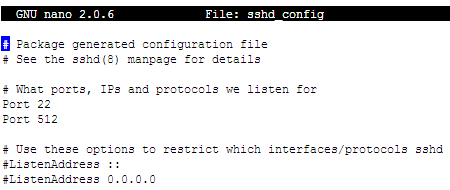
Normally we’re using port number 22 for SSH. If you want to change default port number from 22 to other port number or add another ports for SSH, you can edit in sshd_config under /etc/ssh. To edit sshd_config file, type the following in Terminal or SSH client (SSH Secure Shell or Putty).
nano /etc/ssh/sshd_config
or
vi /etc/ssh/sshd_config
Find “Port“. And change 22 to any port number you want or add another port numbers below.


Digg
del.icio.us
Stumbleupon
Design Float
Subscribe via RSS


No Comments (including trackbacks)
Leave a Reply
I always welcome your valuable comments, positive or negative, and suggestions. Because I believe that comments are energy that keep me up my blogging. If you comment for the first time in my blog, your comment will be in moderated for approval. You can keep post your comment without moderation once your comment has been approved. If your comment contains more than two hyperlinks, it will be held in the moderation queue. Your name and home url will be displayed in your comment and your IP and your email will be keep secret and will not be sold or share to anyone, I promise.