
After successful logged in your wordpress, you’ll see the wordpress dashboard. WordPress Dashboard includes Write, Manage, Design and Comments panel.
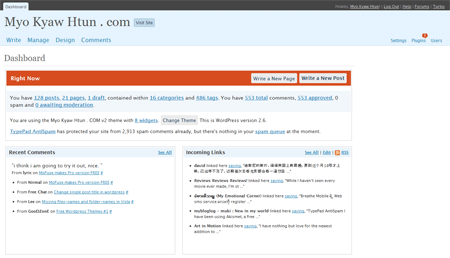
Write
Write panel where you can write new post, page and link (blogroll).
Manage
Manage panel where you can manage posts, pages, categories, Tags, Media, Importing posts from wordpress xml file or other blogging system.
Design
Design panel where you can change or edit your themes uploaded in your server under wp-content/themes folder.
Comments
Comments panel where you can handle all the comments such as deleting, editing and marking comments as spam for your posts.
The rest are Setting, Plugins and Users. WordPress dashboard displays all the information like Recent comments, Incoming link, News feed from WordPress Development blog, popular plugins from WordPress plugin directory and other wordpress news.
Comments
One response to “Overview of WordPress Admin panel”
now you can not worried, my friend told me a website, in here you can buy a lot 2moons gold and only spend a little money