
KPWE Edit is a WYSIWYG Editor especially created for embeding in CMS (Content Management System) web-based application. I created this WYSIWYG Editor while I’m creating CMS application. Currently, KPWE Edit is under development and I wanted to add more features. I embeded default CSS file in this editor so that user can see the actual result while they’re editing the content. In this editor, I used browser IFRAME so that it is easy to load the data from SQL and MySQL dabase into this editor. It supports Internet Explorer, Firefox, Mozilla, Netscape, Safari and Opera.
With KPWE Edit, you can:
- Change font style (Bold, Italic, Underline and Strikethrough)
- Align text (Left, Center, Right and Justify)
- Change font color with color dialog box
- Insert horizonal line
- Insert Ordered list and Unordered list
- Insert Block Quote
- Change sup script and super script
- Insert Anchor Link and remove anchor link
- Insert Image
- Change font name, heading and size
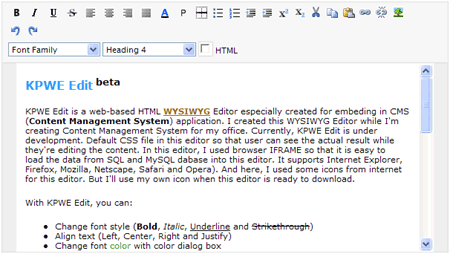
Screen shot of KPWE WYSIWYG Editor
KPWE Edit
.Zip includes manual help file
Comments
One response to “KPWE Edit, web-based HTML WYSIWYG Editor”
[…] Link to Article firefox KPWE Edit, web-based HTML WYSIWYG Editor » Posted at Myo Kyaw Htun . […]