
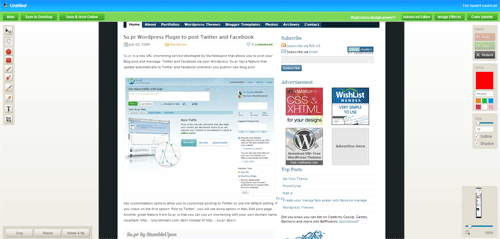
In order to capture the whole web page, I used Browsershots and Super screenshot before. Both of these tools are doing well except Browsershot has many features than Super screenshot. Now there is a new tool called Aviary Screen Capture allows you to capture the whole web page and let you edit on the fly. Aviary not only offers capturing web page capability but also let you edit, put text annotation, pencil brush, arrow and other tools as well. And you can save it into your desktop or host images online. If you’re using Firefox, it has Firefox extension as well as bookmarklets. For instance, you can use http://aviary.com/myokyawhtun.com where (myokyawhtun.com is the url you want to capture).
Comments
6 responses to “Capture whole webpage with Aviary Screen Capture”
As for me, useful with fireshot! I will also try to use it. :)
Awesome Tips!
i was searching alternative for browsershots
thx! :D
i was searching alternative for browsershots
thx! :D
Nice tool. But I prefer fireshot – firefox addon
Thanks. I tried fireshot. Pretty cool and it serves my need alright.
[…] which I have posted in this blog before, which allows you to capture the whole web page. Now it has HTML 5 image editor that can change your photo with instant camera, toy camera, old […]