
I was faced a problem in Vista today. The problem is that all of the folder-names and file-names were missing in large folder view under my drive in Vista. But I can see under sub folders. Strange ? huh. Take a look at the following snapshot.
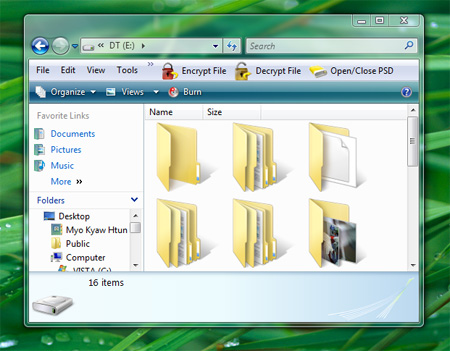
That is always happened when we hold the SHIFT key while we’re opening the drive or folder in Vista. To solve this problem, follow the steps.
1. Switch to detail view.
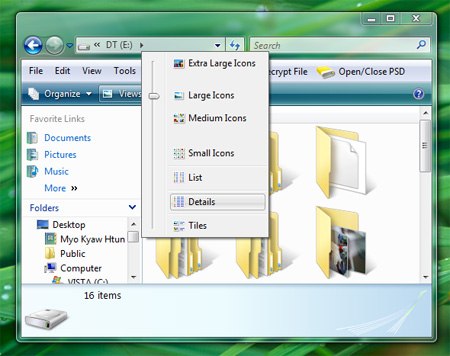
2. Hold down SHIFT key and change to “Medium Icons”.
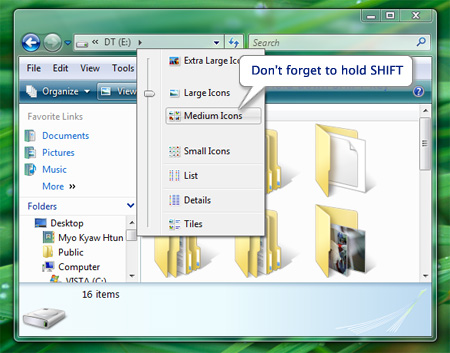
3. Close the Explorer and re-open it again. There you’ll get your folder names and file names back.
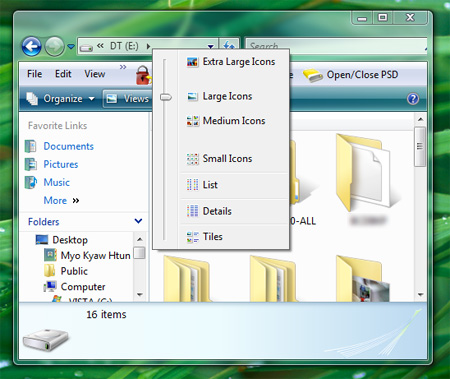
[via this thread]
update: It is also happened in XP.
Comments
14 responses to “Missing files-names and folder-names in Vista”
Hmm… that’s interesting,
Who knows, may be that’s an easter egg. :P
Thanks. man..
I feel it’s strange.. I have been using Windows Vista nearly 8 months. I didn’t have that problem.. My windows version is Home Premium… Did you get that problem in “Large Icons” View? Which Vista version are you using?? If you are sure about that problem, you can probably report this issue to Microsoft.. They will appreciate it..
mmHan
ha ha. could be :P
Michael Sync
One of my buddies said it happened since XP
need help
i am looking to buy a laptop. is window vista good? which is better in window xp professional and window vista?
appreciate ur help
zay
Vista is good ? Yes. But you’ll need high end PC or Laptop to run Vista.
please mail me directly to myochauhtun at gmail dot com
You are a genius…. Thanks
THANK YOU!
I too had the same problem last week, and I was wondering how that happened.
I rename the parent folder to something else and it started showing the file and folder names correctly. Once i rename back to the original name again, the names got missing again!!
Thanks man, you’re a major life saver! I kept having various folders lose their names and this was a great help in getting them back!
thx man, you save the day!! :D
well done. tks a lot. you just saved my mouse that was about to be thrown somewhere around ;-)
Nice job, keep goin’!
i was havingthe same problem an 4real i was so piss ….whit the names gone … and all i did is what you said and … it works ..thank ..that was helpfull
Thank you very much…
I got frustated when seeing my folders without names….
your article helped me to tackle the problem….
It solved my problem. Thanks