
It is really important that you should change your password immediately when you logged in your wordpress panel for this first time after fresh installation of your WordPress. To change your password, click admin link next to “Howdy” text message in upper right corner of your WordPress panel Or type yourblogaddress.com/wp-admin/profile.php in browser address bar.
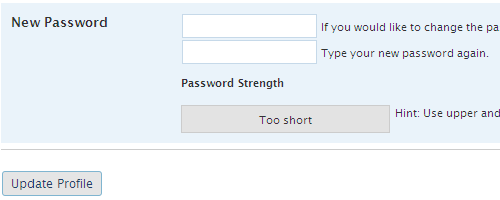
You can change Color scheme of your admin panel, First name, Last name, Nickname, Display name which is used for author name is blog post, contact information, etc in Profile section. This is a WordPress newbie series. I will keep posting like this tutorial in future.


Digg
del.icio.us
Stumbleupon
Design Float


LinkedIn
Facebook
Hi5
Friendster
Orkut
MySpace
MyBlogLog
Flickr
Picasa
YouTube
Last.fm
imeem
mail me
Twitter
Pownce
Plurk
Kwippy
Digg
Stumbleupon
FriendFeed
Shared Items
Shared Stuff
Blogger
Wordpress
Technorati


No Comments (including trackbacks)
Leave a Reply
I always welcome your valuable comments, positive or negative, and suggestions. Because I believe that comments are energy that keep me up my blogging. If you comment for the first time in my blog, your comment will be in moderated for approval. You can keep post your comment without moderation once your comment has been approved. If your comment contains more than two hyperlinks, it will be held in the moderation queue. Your name and home url will be displayed in your comment and your IP and your email will be keep secret and will not be sold or share to anyone, I promise.